

[Oct 07, 2025] Get New UiPath-SAIv1 Certification – Valid Exam Dumps Questions
100% Passing Guarantee - Brilliant UiPath-SAIv1 Exam Questions PDF
NEW QUESTION # 33
Where should a model be pinned in UiPath Communications Mining?
- A. When setting up a stream.
- B. On the models tab.
- C. In Admin > Models.
- D. In the validation page.
Answer: B
Explanation:
According to UiPath documentation, model versions can be pinned and managed on the "models" tab, ensuring that users can maintain and revert to specific versions when necessary for continuity and performance
NEW QUESTION # 34
Which of the following data structures in a UiPath workflow allow dynamic resizing, making it suitable for scenarios where the number of elements is not predetermined?
- A. Tuple
- B. Array
- C. Integer
- D. List
Answer: D
NEW QUESTION # 35
Which of the following is a best practice when choosing a UiPath ML (Machine Learning) Extractor?
- A. The cost of the ML Extractor should be the main consideration. Select the ML Extractor that offers the lowest price, regardless of its performance or suitability for the specific document understanding needs.
- B. The size of the ML Extractor is the most important factor to consider. Bigger models always perform better and provide more accurate extraction results because the development team invested time and effort into creating the algorithm, which in turn will result in better performance for the trained model.
- C. The popularity of the ML Extractor among other UiPath users should be the primary factor. Opt for the ML Extractor that has the highest number of downloads or positive reviews.
- D. Consider the document types, language, and data quality. It is important to select one that is specifically trained or optimized for the document types being processed. It is also important to take into account the quality and diversity of the training data used to train the ML Extractor to ensure accurate and reliable extraction results.
Answer: D
Explanation:
The best practice is to select an ML Extractor based on document types, language, and data quality. Choosing a model specifically optimized for the type of document being processed ensures higher accuracy and reliability. The quality and diversity of the training data used to develop the model play a significant role in its performance.
NEW QUESTION # 36
What happens when multiple users try to label the same document concurrently?
- A. The changes made by one user override the changes made by others.
- B. The changes made by all users are saved successfully.
- C. A warning message is displayed to the other user(s) indicating unsuccessful changes.
- D. Concurrent labeling is not allowed.
Answer: D
Explanation:
According to the UiPath documentation, data labeling is a process that involves uploading raw data, annotating text data in the labeling tool, and using the labeled data to train ML models1. Data labeling is performed by human labelers, who can be either internal or external to the organization2. However, concurrent labeling is not supported by the UiPath Data Labeling tool, which means that only one user can label a document at a time3. If multiple users try to label the same document concurrently, they will encounter an error message that says "The document is locked by another user. Please try again later.". Therefore, the correct answer is C.
References:
1: About Data Labeling 2: Data Labeling Roles 3: Data Labeling Limitations : Data Labeling Error Messages
NEW QUESTION # 37
What is the default visibility of an ML skill?
- A. An ML skill is by default private and can't be made public.
- B. An ML skill is by default private and can be made public.
- C. An ML skill is by default public and can't be made private.
- D. An ML skill is by default public and can be made private.
Answer: B
Explanation:
An ML skill is a consumer-ready, live deployment of an ML or OS package that can be used in RPA workflows. By default, an ML skill is private, which means it can only be accessed by the users who have the permission to view and manage the project that contains the skill. However, an ML skill can be made public by enabling the Public Skill option in the ML Skill Details page. This will generate a public URL and an API key for the skill, which can be used to access the skill from any external system or application12.
References: 1: AI Center - About ML Skills 2: Make ML Skills and Datasets public via URL + API Key - Preview
NEW QUESTION # 38
Which of the following is an indicator that sufficient training has been completed for a model in UiPath Communications Mining?
- A. A model rating of 50-60.
- B. A model rating of 40-50.
- C. A model rating of 70-90 or better.
- D. A model rating of 30-40.
Answer: C
NEW QUESTION # 39
Which of the following options is accepted as a Column field name in Document Manager?
- A. first name
- B. First_name123
- C. first_n@me
- D. f1rst-name
Answer: B
Explanation:
According to the UiPath documentation, the field name for a column field in Document Manager does not accept uppercase letters. It can only contain lowercase letters, numbers, underscore _ and dash -12. Therefore, the only option that meets these criteria is D. First_name123. The other options are invalid because they either contain uppercase letters, spaces, or @ symbols, which are not allowed.
References: 1: Document Understanding - Create and Configure Fields 2: Document Understanding - Create
& Configure Fields
NEW QUESTION # 40
Why is it important to gather and analyze data about the languages in scope?
- A. The main reason is that all taxonomy fields should have their names translated into all the languages presented in the documents to be processed.
- B. If an ML (Machine Learning) extractor is used, the model schema fields should be renamed according to the most frequently used language from the documents to be processed
- C. This is a standard check but has no actual effect on the Document Understanding process.
- D. Different Document Understanding components have support for different languages, so they have to be selected according to the requirements.
Answer: D
Explanation:
It is essential to analyze the languages involved in a project because different components of UiPath's Document Understanding framework have varying language support. For instance, some OCR engines and classifiers support specific languages, and this determines whether a particular language can be processed accurately. As the supported languages differ across components such as the Machine Learning Extractor, Form Extractor, and various OCR services, selecting the right components is crucial to meeting project requirements
NEW QUESTION # 41
What is the order of steps for automatically retraining and deploying a Document Understanding ML Model in Al Center with data from Document Validation Action?
Instructions: Drag the steps found on the "Left" and drop them on the "Right" in the correct order.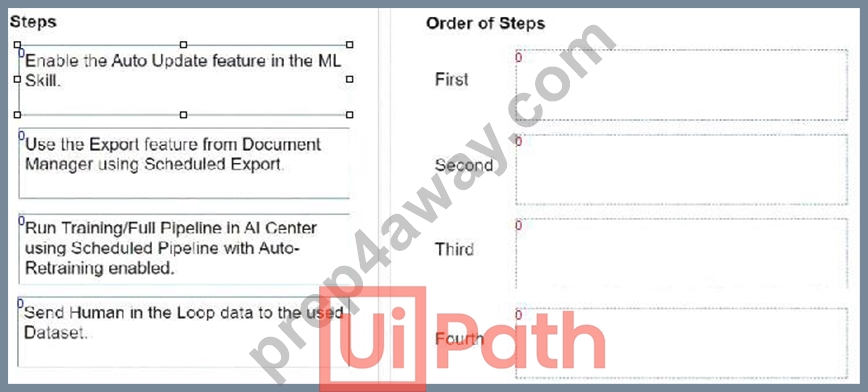
Answer:
Explanation: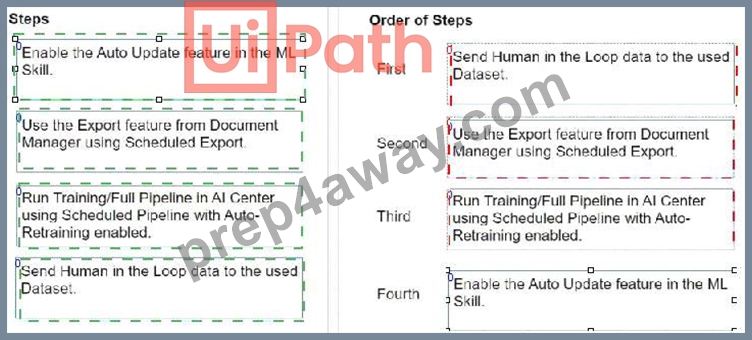
Explanation: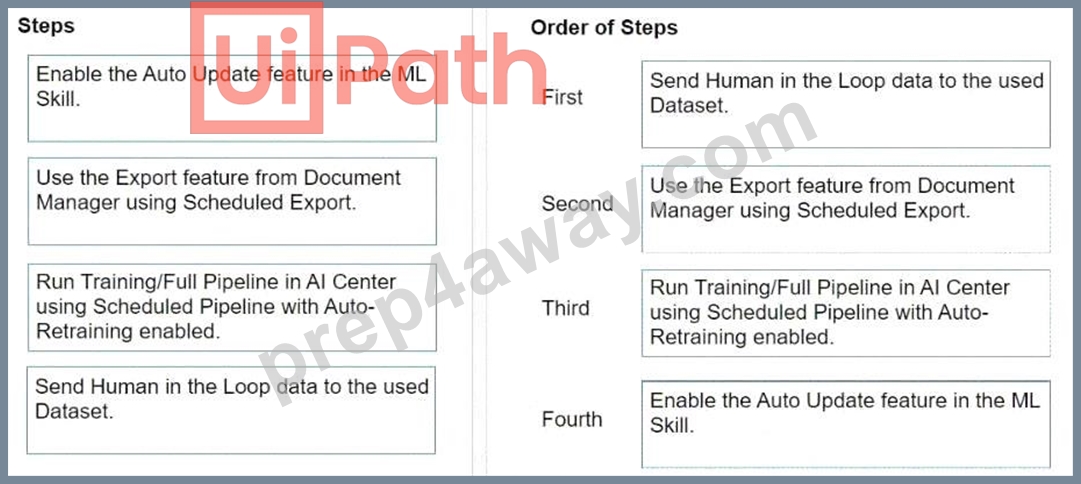
To automatically retrain and deploy a Document Understanding Machine Learning (ML) Model in AI Center with data from the Document Validation Action, the steps should be followed in this order:
* Send Human in the Loop data to the used Dataset.
* This step involves sending the data that has been validated and corrected by human reviewers to the dataset. This data will be used for training the ML model.
* Use the Export feature from Document Manager using Scheduled Export.
* After the data is reviewed and validated, it needs to be exported from the Document Manager.
Scheduled Export automates this process, ensuring the dataset in AI Center is regularly updated with new data.
* Run Training/Full Pipeline in AI Center using Scheduled Pipeline with Auto-Retraining enabled.
* With the updated data in the dataset, the next step is to run the training or the full pipeline. The use of Scheduled Pipeline with Auto-Retraining ensures that the ML model is automatically retrained with the latest data.
* Enable the Auto Update feature in the ML Skill.
* Finally, enabling the Auto Update feature in the ML Skill ensures that the newly trained model is automatically deployed, making the improved model available for document understanding tasks.
Following these steps in the specified order allows for a streamlined process of continuously improving the ML model based on human-validated data, ensuring better accuracy and efficiency in document understanding tasks over time.
NEW QUESTION # 42
What will be displayed in the Output panel after running the workflow below?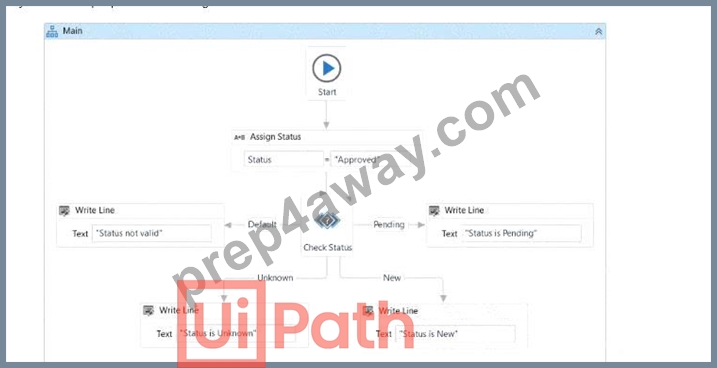
- A. Status not valid.
- B. Status is New.
- C. Status is Unknown.
- D. Status is Pending.
Answer: A
Explanation:
From the provided workflow:
* The Assign Status activity sets the variable Status to the value "Approved".
* The Check Status activity evaluates the value of Status against defined conditions.
* It has branches for "Pending", "New", and "Unknown".
* The "Default" branch is triggered if none of these conditions match the value of Status.
* Since "Approved" does not match "Pending", "New", or "Unknown", the Default branch will execute.
The Write Line activity in the Default branch outputs "Status not valid." to the Output panel.
NEW QUESTION # 43
What is the definition of a UiPath Communications Mining data source?
- A. The model that we create when training the platform to understand the data in those sources.
- B. A collection of raw unlabeled communications data of a similar type, that can be associated with up to
10 datasets. - C. A permissioned storage area within the platform which contains communications and labels.
- D. A user-permissioned project containing a taxonomy with labels and entities.
Answer: B
Explanation:
According to the UiPath documentation, a data source is a raw collection of verbatims, which are text-based communications such as survey responses, emails, transcripts, or calls1. A data source can be of a similar type and share a similar intended purpose, such as capturing customer feedback or servicing requests2. A data source can be added to up to 10 different datasets, which are collections of sources and labels that are used to train and evaluate ML models3. Therefore, the correct definition of a UiPath Communications Mining data source is A.
References:
1: Communications Mining - Sources 2: Communications Mining - Managing Sources and Datasets 3: Communications Mining - Understanding the data structure and permissions
NEW QUESTION # 44
How many types of synchronization mechanisms exist in the Document Understanding Process to prevent multiple robots to write in a file at the same time?2
- A. 0
- B. 1
- C. 2
- D. 3
Answer: D
NEW QUESTION # 45
What will be the behavior of the process if, during design time, the property ValidateUnconnectedNodes is set to True on a flowchart and a Log Message activity from this flowchart is not connected to any other node?
- A. A warning message is displayed in the Output section of Studio, indicating the presence of unconnected activities.
- B. The flowchart displays an error indicating that some activities are not connected to the others within the flowchart.
- C. The flowchart undergoes successful validation with no errors displayed, but an exception will occur during the workflow's runtime.
- D. The flowchart will display an error indicating the presence of unconnected activities, but only when validated using the Workflow Analyzer.
Answer: B
NEW QUESTION # 46
How can you build custom models supported by AI Center?
- A. Using a C/C++ IDE (Integrated Development Environment), then upload the code to Al Center IDE.
- B. Using the Al Center IDE (Integrated Development Environment).
- C. Using the Al Center model builder.
- D. Using a Python IDE (Integrated Development Environment) or an AutoML platform.
Answer: D
NEW QUESTION # 47
What does the Export stage of the Document Understanding Framework do?
- A. Classifies the document as one of the predefined document types.
- B. Converts the result of extraction to a dataset or to a customized format.
- C. Extracts the text out of the image document using OCR (Optical Character Recognition).
- D. Allows a human to validate and correct the extracted data.
Answer: B
Explanation:
According to the UiPath documentation portal1, the Export stage of the Document Understanding Framework is the final stage of the document processing workflow, where the extracted data is converted to a dataset or to a customized format, such as Excel, JSON, or XML. The Export stage enables you to easily export data for training ML models, using the Export files dialog box in Data Manager or Document Manager. The Export stage also allows you to export the schema of the fields and their configurations, which can be imported into a different session. The Export stage supports different export options, such as current search results, all labeled, schema, or all. The Export stage also provides validation rules, such as requiring at least 10 labeled documents or pages for each field, and at least one document for each classification option1. Therefore, option A is the correct answer, as it describes the main function and benefit of the Export stage. Option B is incorrect, as it refers to the Data Validation stage, which is the previous stage of the document processing workflow, where a human can review and correct the extracted data using the Validation Station or the Present Validation Station activities2. Option C is incorrect, as it refers to the Classification stage, which is the second stage of the document processing workflow, where the document is classified as one of the predefined document types using the Classify Document Scope activity and a classifier of choice3. Option D is incorrect, as it refers to the Digitization stage, which is the first stage of the document processing workflow, where the text is extracted out of the image document using OCR (Optical Character Recognition) using the Digitize Document activity and an OCR engine of choice.
References: 1 Document Understanding - Export Documents 2 Document Understanding - Data Validation 3 Document Understanding - Classification Document Understanding - Digitization
NEW QUESTION # 48
What does the Label Trends table in UiPath Communications Mining show?
- A. How the top 10 labels for a given time period perform compared to the previous period and their change in rank.
- B. How the top 10 entities for a given time period perform compared to the previous period and their change in rank.
- C. How the top 10 labels and entities for a given time period perform compared to the previous period and their change in rank.
- D. How the top 10 senders for a given time period perform compared to the previous period and their change in rank.
Answer: A
Explanation:
The Label Trends table in UiPath Communications Mining shows the trend of the top 10 highest volume labels over the selected time period, as well as their percentage change and rank change compared to the previous period1. The table allows users to quickly identify which labels are increasing or decreasing in volume, and by how much, over time. The table also shows the net sentiment score for each label, which is calculated as the difference between the positive and negative sentiment probabilities for each verbatim2. The table can be filtered by data type, source, date range, and label category. Users can also sort the table by label name, volume, percentage change, rank change, or net sentiment1.
References: 1: Trends 2: Sentiment Analysis
NEW QUESTION # 49
......
Free UiPath-SAIv1 braindumps download: https://www.prep4away.com/UiPath-certification/braindumps.UiPath-SAIv1.ete.file.html
UiPath-SAIv1 Dumps 2025 - NewUiPath Exam Questions: https://drive.google.com/open?id=1RIWseZu3-p9JukZANs0ZlL_7eKgV3OYv