

Updated Sep-2021 Test Engine to Practice Test for MS-600 Exam Questions and Answers!
Building Applications and Solutions with Microsoft 365 Core Services Certification Sample Questions and Practice Exam
NEW QUESTION 23
Which URI should you use to query all the emails that relate to an invoice?
- A. https://graph.microsoft.com/vl.e/me/messages?${invoiceid}
- B. https://graph.microsoft.com/vl.6/me/messages?Sfilter=contains(subject,{invoiceid})
- C. https://graph.microsoft.com/vl.0/me/me5sages?$subject eq {invoiceid}
- D. https://graph.microsoft.com/vl.e/me/messages?$search""{Invoiceid}"
Answer: D
NEW QUESTION 24
Note: This question is part of a series of questions that present the same scenario. Each question in the series contains a unique solution that might meet the stated goals. Some question sets have more than one correct solution, while others might not have a correct solution.
After you answer a question in this section, you will NOT be able to return to it. As a result, these questions will not appear in the review screen.
You are developing a new application named App1 that uses the Microsoft identity platform to authenticate to Azure Active Directory (Azure AD).
Currently, App1 can read user profile information.
You need to allow App1 to read the user's calendar.
Solution: In the code of App1, dynamically request the Calendar.Read permission from the Microsoft Graph API.
Does this meet the goal?
- A. No
- B. Yes
Answer: A
Explanation:
For your app to access data in Microsoft Graph, the user or administrator must grant it the correct permissions via a consent process.
Application permissions can only be consented by an administrator.
References: https://docs.microsoft.com/en-us/azure/active-directory/develop/v2-permissions-and-consent
https://docs.microsoft.com/en-us/graph/permissions-reference
NEW QUESTION 25
This question requires that you evaluate the underlined text to determine if it is correct.
You can use a Command Set extension to develop a breadcrumb element that will appear on every Microsoft SharePoint page.
Instructions: Review the underlined text. If it makes the statement correct, select "No change is needed". If the statement is incorrect, select the answer choice that makes the statement correct.
- A. No change is needed
- B. a web part
- C. an Application Customizer
- D. a Field Customizer
Answer: C
Explanation:
Application Customizers provide access to well-known locations on SharePoint pages that you can modify based on your business and functional requirements. For example, you can create dynamic header and footer experiences that render across all the pages in SharePoint Online.
Reference: https://docs.microsoft.com/en-us/sharepoint/dev/spfx/extensions/get-started/using-page- placeholder-with-extensions Extend Teams Question Set 1
NEW QUESTION 26
Match the SharePoint Framework (SPFx) extensions to the correct descriptions.
To answer, drag the appropriate SPFx extension from the column on the left to its description on the right. Each SPFx extension may be used once, more than once, or not at all.
NOTE Each correct match is worth one point.
Answer:
Explanation:
NEW QUESTION 27
You are building email notifications for an expensing system.
When a user receives an email notification, the email will contain a comment field. When the user submits a comment, the data will be returned to the expensing system for processing.
What should you do to implement the notification by using the minimum amount of development effort?
- A. Create a Microsoft Office Add-in that has an action pane to display the notifications
- B. Leverage the Azure SignalR Service and implement web notifications
- C. Configure the expensing system to send actionable messages
- D. Leverage Microsoft Graph notifications
Answer: C
Explanation:
Whether you are filling out a survey, approving an expense report, or updating a CRM sales opportunity, Actionable Messages enable you to take quick actions right from within Outlook. Developers can now embed actions in their emails or notifications, elevating user engagement with their services and increasing organizational productivity.
Office 365 provides two solutions to enhance productivity with Outlook Actionable Messages: actionable messages via email, and actionable messages via Office 365 Connectors.
NEW QUESTION 28
You are developing a Microsoft Teams application for a support staff.
Within a conversation between the support staff, you want the staff to look up support ticket IDs from a list without opening the ticketing system.
Which feature should the application include?
- A. a tab
- B. a connector
- C. a bot
- D. a messaging extension
Answer: D
Explanation:
Messaging extensions allow users to interact with your web service through buttons and forms in the Microsoft Teams client. They can search, or initiate actions, in an external system from the compose message area, the command box, or directly from a message. You can then send the results of that interaction back to the Microsoft Teams client, typically in the form of a richly formatted card.
NEW QUESTION 29
You have a Microsoft 365 tenant.
You develop a custom Microsoft Office Add-in for Word.
You need to sideload the add-in.
You sign in to Microsoft 365 in a web browser and create a new Word document What should you do next?
- A. Select Upload My Add-in and verify that the add-in was installed.
- B. Upload the add-in to Microsoft AppSource.
- C. Upload the add-in to the tenant app catalog.
- D. Attach a remote debugger by using Microsoft Visual Studio Code.
Answer: B
NEW QUESTION 30
You are developing a new Microsoft Office Add-in to integrate a corporate invoicing system and Microsoft Excel.
You need to add a new button to the Office ribbon.
What should you add to the add-in?
- A. a custom function
- B. a dialog
- C. a command
- D. a task pane
Answer: C
Explanation:
Add commands to a custom group
1. In the Customize the Ribbon window under the Customize the Ribbon list, click the custom group that you want to add a command to.
2. In the Choose commands from list, click the list you want to add commands from, for example, Popular Commands or All Commands.
3. Click a command in the list that you choose.
4. Click Add.
5. To see and save your changes, click OK.
Topic 2, Contoso
Existing Environment
Microsoft 365
Contoso identifies the following business goals:
* Utilize core functionality of apps whenever possible.
* Reduce app development costs.
* Minimize training costs for end users.
Microsoft SharePoint/Microsoft Exchange
Contoso has a Microsoft 365 subscription that uses a domain named contoso.com. Each user is assigned a Microsoft 365 Enterprise E5 licence.
Problem Statement
Contoso moves all email accounts to Microsoft 365.
Contoso migrates the SharePoint Server 2013 intranet sites of the research department to SharePoint Online.
Requirements
Business Goals
Contoso identifies the following issues:
* Users in the sales department report that prepanng quotations is time-consuming as it requires manually copying and pasting data from multiple sources.
* Users in the HR department must use multiple apps to manage the hiring process.
* The solution to claim expenses requires multiple manual steps.
Planned Changes
Contoso identifies the following business goals:
* Utilize core functionality of apps whenever possible.
* Reduce app development costs.
* Minimize training costs for end users.
Technical Requirements
Contoso plans to implement the following changes;
* Redesign the SharePoint Online sites of the research department to provide users with an expenence that is consistent with the Microsoft 365 portal. The research department has a third-party project management solution that uses the Microsoft identity platform in Azure AD.
* Create an email workflow solution for expense claims. Users will submit their expense claims and the system will email an approval request to their manager.
* Implement a bring your own device (BYOD) model that supports Windows 10, macOS, and Android devices.
* Develop a custom Microsoft 365 app named SalesApp for the sales department.
* Develop a custom Microsoft 365 app named HRApp for the HR department
Security Requirement
Contoso identifies the following technical requirements for app development:
* The expense claims solution must provide managers with claim information and the ability to manage the claim by using Microsoft Outlook. Outlook on the web, or Outlook for iOS and Android.
* HRApp must include a bot named HRBot that will answer HR questions. Users must be able to access the bot by mentioning HRBot in a Microsoft Teams channel or private chat.
* HRApp must enable users to query a third-party HR system by using a tab from within a Microsoft Teams channel.
* HRApp must include a messaging extension that enables users to search jobs by job title or job ID.
* SalesApp must be integrated with Microsoft Word and must combine images and text from multiple sources to create a quotation as a DOCX file.
* The distribution of SalesApp must be automatic and require minimal user interaction.
* Solutions for SharePoint Online and Microsoft Office must follow the current Office user interface (Ul) design.
* Development tools and solutions must support Windows and non-Windows devices.
* Development effort must be minimized.
HRApp Manifest
All solutions must support the Microsoft identity platform in Azure AD.
Intranet components must not share access tokens.
NEW QUESTION 31
You are building a conversational bot that will have an interactive Ul. When the user invokes the bot by using a keyword, the bot will reply with a dialog that lets the user choose one of multiple options.
After the user chooses an option, and the response is received by the backend logic, you need to prompt the user to select additional options.
Which two actions should you perform? Each correct answer presents part of the solution.
NOTE: Each correct selection is worth one point.
- A. Implement a Hero Card that has an invoke card action.
- B. Return an HTTP response that contains a Taskinfo object of type continue and an Adaptive Card.
- C. Implement an Adaptive Card thathasanAction.showCard card action.
- D. Return an HTTP response that contains a Taskinfo object of type message and an embedded web view.
- E. Return an HTTP response that contains a Taskinfo object of type message and an Adaptive Card.
Answer: B,E
NEW QUESTION 32
You have a line-of-business API that is secured by using Azure Active Directory (Azure AD).
You deploy a solution to the app catalog. The solution requests permission to the API.
What should you do in the SharePoint admin center to ensure that the solution can access the API?
- A. Approve a pending permission request
- B. Create a SharePoint security group and add the solution
- C. Enable sandbox solutions
- D. Create an access policy
Answer: A
Explanation:
Developers building a SharePoint Framework solution that requires access to specific resources secured with Azure AD list these resources along with the required permission scopes in the solution manifest. When deploying the solution package to the app catalog, SharePoint creates permission requests and prompts the administrator to manage the requested permissions. For each requested permission, tenant administrators can decide whether they want to grant or deny the specific permission.
All permissions are granted to the whole tenant and not to a specific application that has requested them.
When the tenant administrator grants a specific permission, it is added to the SharePoint Online Client Extensibility Azure AD application, which is provisioned by Microsoft in every Azure AD and which is used by the SharePoint Framework in the OAuth flow to provide solutions with valid access tokens.
NEW QUESTION 33
You have a SharePoint Framework (SPFx) web part that includes the manifest shown in the following exhibit.
Which task can the web part perform?
- A. Send an email on behalf of a mail-enabled group.
- B. Send an email as another user.
- C. Send an email as the current user.
- D. Send an email as the web part.
Answer: D
NEW QUESTION 34
You are developing a Microsoft Teams solution to host an existing webpage as a Teams tab.
Which requirement must the page meet?
- A. The page must use CSS3 stylesheets
- B. The page must adhere to HTML 5.0 standards
- C. The page must adhere to WCAG 2.0 accessibility guidelines
- D. The page must be hosted on a domain that is on the validDomains list of the manifest
Answer: D
Explanation:
Make sure that all domains used in your tab pages are listed in the manifest.json validDomains array.
Reference:
configuration-page
NEW QUESTION 35
This question requires that you evaluate the underlined text to determine if it is correct.
Centralized deployments for Microsoft Office Add-ins require Office Online Server.
Instructions: Review the underlined text. If it makes the statement correct, select "No change is needed". If the statement is incorrect, select the answer choice that makes the statement correct.
- A. Azure Active Directory (Azure AD)
- B. an Azure web app
- C. Azure AD Connect
- D. No change is needed
Answer: D
Explanation:
Centralized deployment of add-ins requires that the users are using Office 365 ProPlus (and are signed into Office using their Organizational ID), and have Exchange Online and active Exchange Online mailboxes.
NEW QUESTION 36
You have an application that uses the Microsoft Graph API.
You need to configure the application to retrieve the groups to which the current signed-in user belongs. The results must contain the extended priorities of the groups.
Which URI should you use?
- A. https://graph.microsoft.com/v1.0/me/checkMemberGroups
- B. https://graph.microsoft.com/v1.0/me/getMemberGroups
- C. https://graph.microsoft.com/v1.0/me/getMemberObjects
- D. https://graph.microsoft.com/v1.0/me/memberOf
Answer: B
Explanation:
Explanation
Get member groups returns all the groups that the specified user, group, or directory object is a member of.
This function is transitive.
Reference: https://docs.microsoft.com/en-us/graph/api/directoryobject-getmembergroups
NEW QUESTION 37
You need to recommend the development environment and tools for the development of SalesApp. What should you recommend? To answer, select the appropriate options in the answer are a. NOTE: Each correct selection is worth one point.
Answer:
Explanation:
NEW QUESTION 38
What is the default permission scope when you request an access token by using MSGraphClient?
- A. User.Read
- B. People.Read
- C. People.Read.All
- D. User.Read.All
Answer: D
Explanation:
Explanation/Reference:
Explanation:
By default, the service principal has no explicit permissions granted to access the Microsoft Graph. However, if you request an access token for the Microsoft Graph, you get a token with the user_impersonation permission scope that can be used for reading information about the users (that is, User.Read.All).
Reference: https://docs.microsoft.com/en-us/sharepoint/dev/spfx/use-msgraph Extend Teams Question Set 1
NEW QUESTION 39
You are developing an application that will use Microsoft Graph.
You attempt to retrieve a list of the groups in your organization by using a URI of https://graph.microsoft.eom/vi.0/groups on behalf of the user.
The application fails. The diagnostic logs show the following information:
* An HTTP 403 Forbidden status code
* An Authorization_RequestDenied error code
* The following error message: "Insufficient privileges to complete the operation." You need to ensure that the application can retrieve the list of groups. The solution must use the principle of least privilege. Which two actions should you perform? Each correct answer presents part of the solution. NOTE; Each correct selection is worth one point.
- A. In the permission request for the application, request the Group. Readwrite. All permission
- B. Configure the application to use application permissions.
- C. In the permission request for the application, request the Group. Read. All permission.
- D. Grant tenant admin consent for the Group.Read. All permission.
Answer: A,C
NEW QUESTION 40
You are designing a custom SharePoint Framework (SPFx) web part that will be deployed to modern Microsoft SharePoint sites.
You need to ensure that all the web part fields and controls adopt the theme of the site when you deploy the web part.
What should you use to develop the web part?
- A. Fluid Framework
- B. HTML 5.0 and CSS
- C. Office UI Fabric React
- D. Material-UI
Answer: C
Explanation:
Explanation
Office UI Fabric is Microsoft's official front end framework for building User Interface experiences for Office and Office 365. In simple terms it gives you the look and feel for your component. Moreover, they are open source, mobile responsive and reusable, no need to create from scratch just refer them in your code and start utilizing them.
Microsoft modern SharePoint out of the box webparts are made up these Office UI Fabric framework, so to maintain consistency look and feel as like Office it's better to use these components in our custom SPFx webparts.
Reference:
http://www.sharepointsamples.com/sharepoint-framework-webpart-with-office-ui-fabric-react-component/
NEW QUESTION 41
You need to develop an add-in for Microsoft Excel that can be used from the Windows, Mac, and web versions of Excel.
What are two ways to develop the add-in? Each correct answer presents a complete solution?
NOTE: Each correct selection is worth one point.
- A. Use the Yeoman generator for Microsoft Office Add-ins to create the project, and then open the project in Microsoft Visual Studio Code
- B. From Microsoft Visual Studio that has the Microsoft Office/SharePoint development workload installed, create a new project that uses a Web Add-in template
- C. From Microsoft Teams, install App Studio
- D. From Microsoft Visual Studio that has the Microsoft Office/SharePoint development workload installed, create a new project that uses a Visual Studio Tools for Office (VSTO) template
- E. From the Microsoft Office 365 portal, use Microsoft PowerApps
Answer: A,D
Explanation:
Explanation
D: Run the following command to create an add-in project using the Yeoman generator:
yo office
Visual Studio Code is a great tool to help you develop your custom Office Add-ins regardless if they are for Outlook, Word, Excel, PowerPoint and run in the web clients, Windows clients, iOS clients or on macOS.
Open the project in Visual Studio Code by entering the following on the command line from within the same folder where you ran the generator:
code.
E: You can create VSTO Add-ins for Excel.
To create a new Excel VSTO Add-in project in Visual Studio
* Start Visual Studio.
* On the File menu, point to New, and then click Project.
* In the templates pane, expand Visual C# or Visual Basic, and then expand Office/SharePoint.
* Under the expanded Office/SharePoint node, select the Office Add-ins node.
* In the list of project templates, select Excel 2010 Add-in or Excel 2013 Add-in.
* In the Name box, type FirstExcelAddIn.
* Click OK.
Visual Studio creates the FirstExcelAddIn project and opens the ThisAddIn code file in the editor.
References: https://docs.microsoft.com/en-us/office/dev/add-ins/tutorials/excel-tutorial
https://code.visualstudio.com/docs/other/office#_use-visual-studio-code-to-develop-your-office-addin
https://docs.microsoft.com/en-us/visualstudio/vsto/walkthrough-creating-your-first-vsto-add-in-for-excel
NEW QUESTION 42
For each of the following statements, select Yes if the statement is true. Otherwise, select No.
NOTE: Each correct selection is worth one point.
Answer:
Explanation: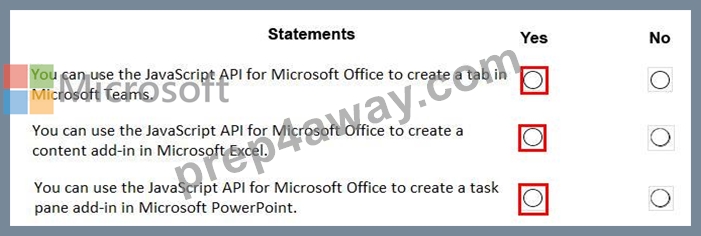
Reference:
https://docs.microsoft.com/en-us/office/dev/add-ins/develop/support-for-task-pane-and-content-add-ins
NEW QUESTION 43
This question requires that you evaluate the bold text to determine if it is correct.
You can use a Command Set extension to develop a breadcrumb element that will appear on every Microsoft SharePoint page.
Instructions: Review the underlined text. If it makes the statement correct, select "No change is needed". If the statement is incorrect, select the answer choice that makes the statement correct.
- A. No change is needed
- B. a web part
- C. an Application Customizer
- D. a Field Customizer
Answer: C
Explanation:
Application Customizers provide access to well-known locations on SharePoint pages that you can modify based on your business and functional requirements. For example, you can create dynamic header and footer experiences that render across all the pages in SharePoint Online.
NEW QUESTION 44
You have a SharePoint Framework (SPFx) 1.5 solution.
You need to ensure that the solution can be used as a tab in Microsoft Teams.
What should you do first?
- A. Deploy the solution to a developer site collection
- B. Upgrade the solution to the latest version of SPFx
- C. Deploy the solution to the Microsoft AppSource store
- D. Convert the solution to use the Bot Framework
Answer: B
Explanation:
Starting with the SharePoint Framework v1.8, you can implement your Microsoft Teams tabs using SharePoint Framework.
Reference: https://docs.microsoft.com/en-us/sharepoint/dev/spfx/web-parts/get-started/using-web-part-as-ms- teams-tab
NEW QUESTION 45
You are building a server-based web app that will use OAuth2 and will be registered with the Microsoft identity platform.
Which two values does the app require to obtain tokens from the Azure Active Directory (Azure AD) authorization endpoint? Each correct answer presents part of the solution.
NOTE: Each correct selection is worth one point.
- A. the tenant ID
- B. the context token
- C. the application secret
- D. the application ID
- E. the authorization code
Answer: D,E
Explanation:
Explanation
C: The required client_id is the Application (client) ID that the Azure portal - App registrations experience assigned to your app.
E: The authorization code flow begins with the client directing the user to the /authorize endpoint.
Reference: https://docs.microsoft.com/en-us/azure/active-directory/develop/v2-oauth2-auth-code-flow
NEW QUESTION 46
You are developing a server-based web app that will use OAuth2 on behalf of the user and will be registered with the Microsoft identity platform.
Which two types of token will the app retrieve as part of the authorization flow? Each correct answer presents part of the solution. NOTE: Each correct selection is worth one point.
- A. Kerberos token
- B. refresh token
- C. context token
- D. access token
- E. SAML token
Answer: A,E
NEW QUESTION 47
You are developing a single-page application (SPA).
You plan to access user data from Microsoft Graph by using an AJAX call.
You need to obtain an access token by the Microsoft Authentication Library (MSAL). The solution must minimize authentication prompts.
How should you complete the code segment? To answer, select the appropriate options in the answer area.
NOTE: Each correct selection is worth one point.
Answer:
Explanation:
Explanation
Box 1: loginPopup
Box 2: acquireTokenSilent
The pattern for acquiring tokens for APIs with MSAL.js is to first attempt a silent token request by using the acquireTokenSilent method. When this method is called, the library first checks the cache in browser storage to see if a valid token exists and returns it. When no valid token is in the cache, it sends a silent token request to Azure Active Directory (Azure AD) from a hidden iframe. This method also allows the library to renew tokens.
Box 3: acquireTokenPopup
//AcquireToken Failure, send an interactive request.
Example:
userAgentApplication.loginPopup(applicationConfig.graphScopes).then(function (idToken) {
//Login Success
userAgentApplication.acquireTokenSilent(applicationConfig.graphScopes).then(function (accessToken) {
//AcquireToken Success
updateUI();
}, function (error) {
//AcquireToken Failure, send an interactive request.
userAgentApplication.acquireTokenPopup(applicationConfig.graphScopes).then(function (accessToken) { updateUI();
}, function (error) {
console.log(error);
});
})
}, function (error) {
console.log(error);
});
Reference: https://github.com/AzureAD/microsoft-authentication-library-for-js/issues/339
NEW QUESTION 48
......
Certification dumps Microsoft 365 Certified: Developer Associate MS-600 guides - 100% valid: https://www.prep4away.com/Microsoft-certification/braindumps.MS-600.ete.file.html
100% Pass Your MS-600 Building Applications and Solutions with Microsoft 365 Core Services at First Attempt with Prep4away: https://drive.google.com/open?id=1keVfXLnyyOB8W8K0AqJxDALDQssoiPZ1